FREE ENGLISH MOVIES
Posted by Unknown | Labels: MOVIE MASTHI | Posted On Tuesday, February 2, 2010 at 2/02/2010 05:26:00 AM
WWW.FREEMOVIESCINEMA.COM
Online place where you can watch free movies - full features (all genres from zombie horrors, adrenaline action to cult and classic silent movies, comedy, documentary,...) TV Shows, Fanfilms, Short movies and Animated flicks. Search through our database of comedies, mystery, westerns, musicals, action, adventure, drama, martial arts, war, sci-fi, horror, TV series and animations for free online movies that you can watch instantly. Most of the movies (public domain or free uploaded/offered by production companies) we fully host. Enjoy and have fun!
DOWNLOAD FREEMOVIES,S/W,GAMES ,MP3'S,TECH NEWS
Posted by Unknown | Labels: MOBILE DOWNLOADS, MOVIE MASTHI, MUSIC SITES, SOFTWARES | Posted On at 2/02/2010 04:52:00 AM
[REGISTER AS A MEMBER TO ACESS]
HI friends from this site u can download free things from diferent areas like rapidshare,mediafire,filefacto,megaupload
downloads from mediafile allows parlell downloads idm supported
How to track the original location of an email via its IP address
Posted by Unknown | Labels: TECH TIPS | Posted On Thursday, December 10, 2009 at 12/10/2009 08:04:00 PM
Here’s a quick how-to guide on how you can track email to it’s originating location by figuring out the email’s IP address and looking it up. I have found this to be quite useful on many occasions for verification purposes since I receive lots of emails daily due to my blog. Tracking the IP address of an email sender does require looking at some technical details, so be ready to dig your heels in!
There are basically two steps involved in the process of tracking an email: find the IP address in the email header section and then look up the location of the IP address.
Finding the IP address of an email sender in GMail, Yahoo Mail, and Outlook
Let’s go ahead and take a look at how you would do this for Google, Yahoo and Outlook since those are the most popular email clients.Google’s Gmail
1. Log into your account and open the email in question.
2. Click on the down arrow that’s to the right of the Reply link. Choose Show Original from the list.
Now here’s the technical part that I was telling you about earlier! You need to look for the lines of text that start with “Received: from“. It might be easier to simply press Cntrl + F and perform a search for that phase. You’ll notice that there are several Received From’s in the message header. This is because the message header contains the IP addresses of all of servers involved in routing that email to you.
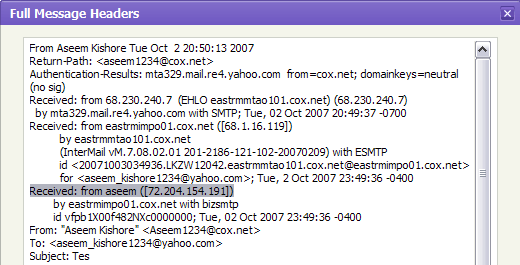
To find the first computer that originally sent the email, you’ll have to find the Received From that’s farthest DOWN. As you can see from the above image, the first one is from a computer called “aseem” with the IP address 72.204.154.191. Then it was routed to my ISP’s server at eastrmmtao104.cox.net and so on and so forth till it got to your email server.
The computer aseem is my personal home computer and that’s my public IP address for my house! I’ll go through Yahoo and Outlook before talking about tracking the location of that IP address.
Yahoo Mail Beta
1. Log into your account and open the email (if you’re using Yahoo Mail Beta with the new preview interface, make sure you double-click on the email so that it opens in a new tab)
2. At the top right, you’ll see there is a drop-down option where Standard Header is selected by default.
3. Click on it and choose Full Header.
Again, you’ll see the same information as before, just in a different window:
Microsoft Outlook
1. Open the email in Outlook by double-clicking on it
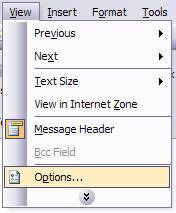
2. Go to View at the top menu (the menu options for the email, not the main Outlook window) and choose Options.
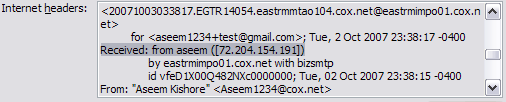
You’ll get a dialog box where you can set the message options and at the bottom you’ll see the Internet Headers box. For some silly reason, the box is very small and you have to scroll a lot, so it’s best to simply copy and paste the text into Notepad to view it more easily.
Tracking the location of an IP address
Now that we have our originating IP address of 72.204.154.191, let’s find out where that is! You can do this by perform a location lookup on the IP address. My favorites are IP2Location and GeoBytes IP Locator.GeoBytes gave me a big map of New Orleans, LA along with a bunch of other information about the location itself.
IP2Location also gave me the same information pretty much, including the ISP (Cox Communications). Of course, this is correct since I live in New Orleans!
If you want more information, you can do a WHOIS database search also. My favorite one is the ARIN WHOIS Database Search. This will give you information on who hosts that IP address and their registration information. You can always contact them to try and find more information on that particular IP address.
Have fun tracking down those emails! Questions, comments, or suggestions? Post a comment!
COLECTED frm-[http://www.online-tech-tips.com]
CONVERTING PDF FILE TO WORD/EXCEL/JPEG
Posted by Unknown | Labels: TECH TIPS | Posted On at 12/10/2009 07:55:00 PM
Convert a PDF file to JPG – Easy Way
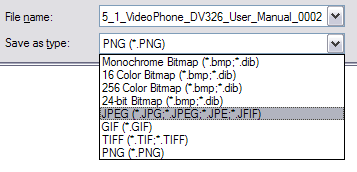
Go to ZAMZAR.COM, browse for your file and choose PNG format for the format to conver to under Step 2. PNG is another newer picture format that is slowly replacing the JPG format. Most programs that can open JPG files can open PNG. Zamzar automatically converts each page in the PDF document into it’s own PNG picture file. Now you can simply open Microsoft Paint (yes, all you need it Paint!) and choose File – Save As from the menu and choose JPEG from the drop down list of formats.
That’s it! By the way, if youare interested in
How to extract the text from a PDF document
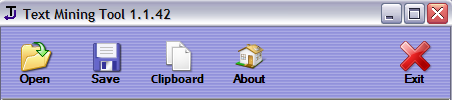
You can use Text-Mining-Tool to automatically extract text from a PDF file so that you can use it in any program freely. Or if you cannot open a PDF file because you do not have a PDF viewer installed, you can use this tool to extract the text and read the document.
Text Mining Tool is completely free and does not even require an installation, simply unzip it and run the program to use it.
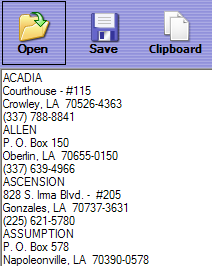
Click the Open button and choose your file that you want to convert to text. Click ok and the large window below the buttons will eventually fill with all of the text extracted from the document.
Click Save to save the extracted text to your computer. You can also click Clipboard to copy the mined text to the Windows clipboard.
For convenience, the following hotkeys can be used to perform the operations:- Open – F3 or O.
- Save – F2 or S.
- Clipboard – F5 or C.
- Exit – F10 or Escape.
You can also use the minetext console tool to create a batch script for extracting text from multiple files. This can be useful if you have a directory with a large number of files that need to have text extracted.
The included console tool minetext has the following syntax:If you’re a web designer, this program can be very useful to grab the text from a Word document without getting all of the extra microsoft office styling code included with the text.minetext minetext
This is a very simple program that is very simple to use! It has one basic purpose and it does a good JOB Enjoy!
How to convert Word files to PDF
Well, there is a web site called ZARZAR and it’s a completely free tool that you can use to convert between just about any possible type you can think of! They have all the document types, image types, music formats, and video formats! This is so much better than those commercial apps that only convert between specific formats and they cost some!
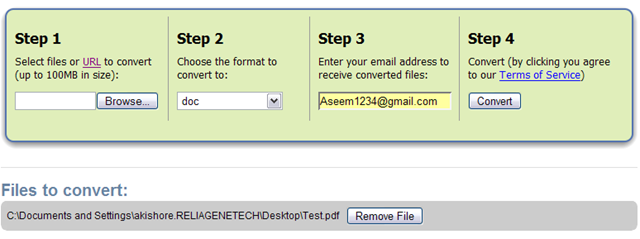
And it’s terribly easy, off the main page, just browse for your file, pick what you want it converted to, enter your email address and click Convert! I tried to convert a PDF to Word and it took about 1 minute to upload the file, receive an email and download the converted file! Now that’s a cool service. So if you or your business needs to convert files, this is the place to go!
Enjoy!
Convert PDF to JPG Format – Second Way
The first thing you’ll need to do is download a free software (the only one I could find) that converts PDF documents to JPEG image format automatically. Go to the Omniformat download page and download both Omniformat v8.3 and the PDF995 app. You will need to download and install PDF995 first before installing Omniformat. Once you have both programs installed, go to your Start Menu programs, find the program group Software995 and click on Omniformat.The only annoying thing about this program is that it requires you to view some ads for about 30 seconds! However, it’s better than paying $20 or $40 for a program just to do a simple conversion! It does pop up another instance of your browser window for the web site of each of the sponsors, but it does not install any spyware onto your computer (no popup ads). Once the program is loaded, you’ll see it has a section called “Watch Folders” and then a button at the bottom titled “Start Monitoring” and “Single Pass“.
Convert your PDF to a Word document
Go to Zamzar.com and click the Browse button next to Step 1 and choose your file. By default, Step 2 will be set to DOC format, but you can choose to convert your PDF to other file types such as TXT, HMTL, RTF, etc. Type in your email address for Step 3 and click Convert.You should receive an email within a few minutes with a download link to your converted file. I have tried out this service on some pretty complex PDF documents with text in multiple columns, multiple images, etc and have been very impressed with it’s conversion accuracy.
Convert a PDF file to Excel format
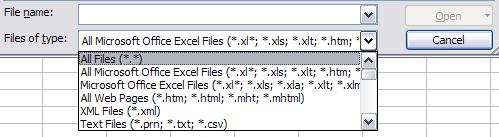
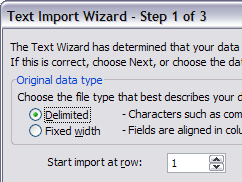
We will again follow the steps above using Zamzar, but this time choose TXT as the format you want to convert to. Unfortunately, you can’t convert straight to Excel format, so we’ll have to go through the intermediary TXT format. Once you have downloaded the TXT file and saved it on your computer, open Microsoft Excel and go to File – Open and change the Files of Type combo box to All Files.Now you should see the converted text file in the list of files. Choose it and click Open. You’ll now be brought to the Text Import Wizard. You have to open the file in this manner because if you simply right-click and say Open With Excel, all of the text for each row will appear in the first column and not be separated.
For Step 1, choose Delimited from the two options listed.
Click Next and check off the Space checkbox as one of the delimiters. Each value should now be separated by a vertical line, indicating it’s going to be in a separate column.
It’s as easy as that! You can use many other image editing programs also such as Photoshop, Corel, etc, etc, but I chose Paint because that is universally available on just about every Windows computer.
COLECTED frm-[http://www.online-tech-tips.com]
Subscribe to:
Posts (Atom)